The success of any meeting has much to do with inviting the right people and knowing who is in the room. Traditionally, this has been done with a roundtable introduction session, which can be time consuming, and which stands a good chance of losing the attention of participants.
People Insights is a Webex feature that brings rich contextual attendee data into meetings by leveraging and integrating the capabilities of Accompany into Webex Meetings. Cisco acquired Accompany in May 2018, and this represents the first integration of its relationship intelligence platform into the Webex collaboration suite. When a Webex meeting starts up, participants will be able to see profiles populated with information gathered from publicly available sources to build a unique profile for each individual.
People Insights uses discernment logic, a proprietary approach to recognizing the difference between the Pat Smith currently on the roster for the meeting and the thousands of other “Pat Smiths” who have a public presence online. This ensures access to correct, contextual, and relevant information on each participant in the room.
The types of information presented on each attendee includes:
Instant access to this type of material makes it easier to elevate the meeting experience.
Outside of the world of internal meetings, there is the vital world of customer care. Historically, this has been the domain of telephone-based customer service representatives (CSRs) and interactive voice response (IVR) telephone systems.
The modern marketplace places far higher priority on positive experience as a chief attractor and retainer of customers. As such, customer care is now more than ever about automating, while still personalizing the customer digital journey so that everyone feels fully understood and cared for. Although bots and automation have been used for years, they have not employed substantive intelligence to accurately track and respond to a customer’s specific needs of the moment. With Cisco Answers, an organization can provide data sheets, FAQs, and other data sources, which can be ingested and modeled by Google’s contact center AI, resulting in realtime information being provided to agents based on the context of the callers’ questions.
These include virtual and personal assistants and are essentially intelligent software agents that can carry out tasks that assist the end user in a collaboration use case. Virtual assistants can take many forms. For an enterprise they can be both internal facing, such as personal and employee assistants, and external facing, as in customer-care assistants. Bot interactions are typically text based, although interaction via voice is also an important use case.
A critical component of any virtual assistant is the ability to understand the intent of the user. Therefore, Cisco employs powerful natural language processing technologies based on MindMeld Workbench to deliver a process called conversational AI. Conversational AI includes NLP, dialog management, and question answering abilities.
Note: The initial implementation of Webex Assistant is more instructional in nature, due to the use cases that it solves for; however, conversational AI is a clear direction for Webex Assistant.
Here is an example of how conversational AI will work:
An individual speaks to a Cisco MindMeld Workbench— powered enterprise virtual assistant and says:
“Schedule a meeting with Janice from accounting from 11 a.m. to noon in the Acquerello Room.” The virtual assistant replies, “Your meeting with Janice has been scheduled for 11 a.m. today in the Acquerello Room.”
In the background, a complex parsing procedure seeks to understand the meaning of what was asked. It follows a sequence like this:
Figure 4. ML components of conversational AI functionality
This type of conversation appears simple to the outside viewer but requires significant computing power to parse and respond correctly and quickly. You can also see how, if any information was missing from the request, the dialog manager and question-answer module would request the required information from the user. For example, if the user did not specify an end time, the assistant would realize that it does not have the information to complete the request and could converse with the user to get the information it needs. It uses a combination of ML features to provide conversational AI functionality that can be exemplified in Figure 4 on the previous page.
The conversational AI model helps pave the way for a range of accurate and intelligent assistants for the workspace. It allows people to use their voice to accomplish meeting-related tasks such as starting a scheduled meeting, joining a Webex Personal Room (PR), or calling anyone in the company directory just by saying their name.
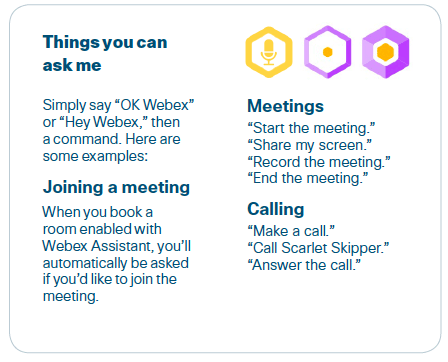
Webex Assistant is the keystone tool of Cisco’s Cognitive Collaboration capability. It is activated by using the wake word “OK Webex,” followed by one of many supported spoken instructions. Figure 5 is a screen shot of some functions Webex Assistant can perform.
Figure 5. Webex Assistant interface
The interactions described in Figure 5 are just the start. A near-future scenario might sound something like this:
Webex Assistant: Welcome Catherine, your next meeting is starting in five minutes. Would you like to know who accepted the invitation?
Catherine: Yes, how many people?
Webex Assistant: Three have accepted: Maria Rossi, Peter Hogan, and Sherry McKenna. Benjamin Vitali has not yet responded. Would you like to start the meeting now?
Catherine: Yes, can you please share the latest deck from our space?
Webex Assistant: Yes, your deck “Q1 Roadmap” has been shared.
Collaboration and communication are still currently focused on speech and audio quality. Although the applicability of visual technology is growing quickly, as described in the next section, for the time being, most people are used to audio-related communication as central to their efforts. As such, a successful communication platform must be able to intelligently understand the role of speech and of other sounds in the workplace environment.
Webex provides machine-learning-based noise detection in Webex Meetings clients and Webex Room Series devices to intelligently and automatically identify and eliminate background sounds like keyboard typing, barking dogs at the home office, and traffic noise.
The suppression system follows a logical instruction set to:
Future iterations of the Cognitive Collaboration suite will allow for accurate production of transcripts from meeting recordings. We are currently experimenting with this technology. This will offer the ability to search for meeting outcomes and identify follow-up work items.
Webex Meetings devices provide collaboration telemetry, which can inform utilization trends and help with troubleshooting for customers through Webex Control Hub. Providing this information to customers allows them to understand collaboration trends and manage the overall experience across the portfolio.
After establishing a solid and reliable protocol for voice and language, the next most important feature is visuals. Humans take in a significant amount of comprehension through what they see. In a collaborative context, this includes inferring meaning and emotion through body language, and establishing relationships of trust through eye contact and face-to-face connection.
Meetings and collaboration are also served better when participants can see that their colleagues are engaged and focused, as well as when they are distracted, bored, or in disagreement. A quality visual connection allows for greater context, to help people understand who is involved in the meeting and read physical gestures and see physical objects (such as product prototypes or graphic charts) that are physically in the room.
Improved visual communication has only become possible in the last few years as network bandwidth and computing power have made web conferencing and video conferencing reliable and cost-efficient.
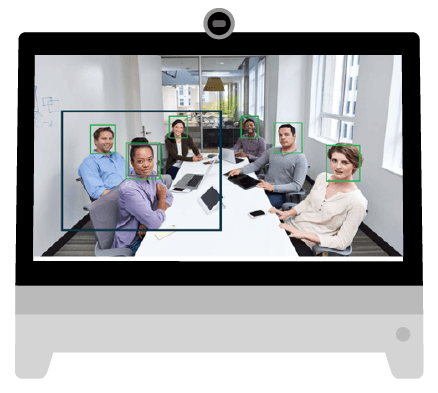
Rather than simply focusing on delivering a visual image, the Cisco Cognitive Collaboration solution offers intelligence, context, and proactivity by ensuring unimpeded understanding of the people and the topics involved. This is what we call computer vision. It primarily consists of:
Being able to accurately recognize faces, particularly as they move and speak, is an enormous achievement for a computer. Not only are there billions of possible identities to choose from for each human face, there are privacy and identity concerns and laws that dictate how a platform could even collect and store what it needs in order to identify and learn.
Facial recognition involves supervised learning as well as an ML subset called deep learning (DL), which allows for decisions and understanding to be done through a more thorough contextual understanding.
Typically, a face recognition system will use facial features in order to create a description of the face. Once a face is detected, the measurements between key points in the face image are used to create a description that can be returned in a variety of formats. This process recognizes that there is a face there but cannot yet identify it.
However, once the face description can be turned into a face identifier and pushed through a machine learning process using supervised learning or deep learning techniques, it then becomes possible to identify an end user with reasonable accuracy.
Cisco uses NVIDIA GPUs in endpoints to run algorithms to precalculate user descriptions for facial recognition.
Within the context of facial recognition, the deep learning model assigns a numerical identifier to each face it reads. It then works to figure out which known identity is a best match with the highest degree of confidence. Importantly, the user remains in control of their data for this feature to work. This is critical for enterprise deployments of face recognition systems.
Gesture recognition also plays a role in Cognitive Collaboration. People often use the same physical gestures in a collaboration setting, and in future releases these will be recognized and interpreted by the system.
These are two related concepts that focus on the ability to recognize objects within a collaboration environment. Take the example of a computer vision system that can count and identify the people in a meeting room, compare this to the names on the roster, and compare this to the available seating in the room. The system may be able to determine if the room is under- or oversubscribed and could possibly identify and reserve a better meeting location that is available nearby. The benefits of such a solution (to be made available in a future release) would help both the local and remote meeting participants, in addition to being good for meeting efficiency and building resource occupancy and utilization.
Proximity pairing calculates the distance of a specific person from the camera and microphone, which allows the software to tailor sound input volumes and gesture recognition without that person becoming lost in the background.